

Handoff Bundle
The Handoff ZIP bundles the most common export formats of one language version of a deck into a single download, for people who do not use Deckyard: a client, a venue, a colleague who needs a copy to present from.
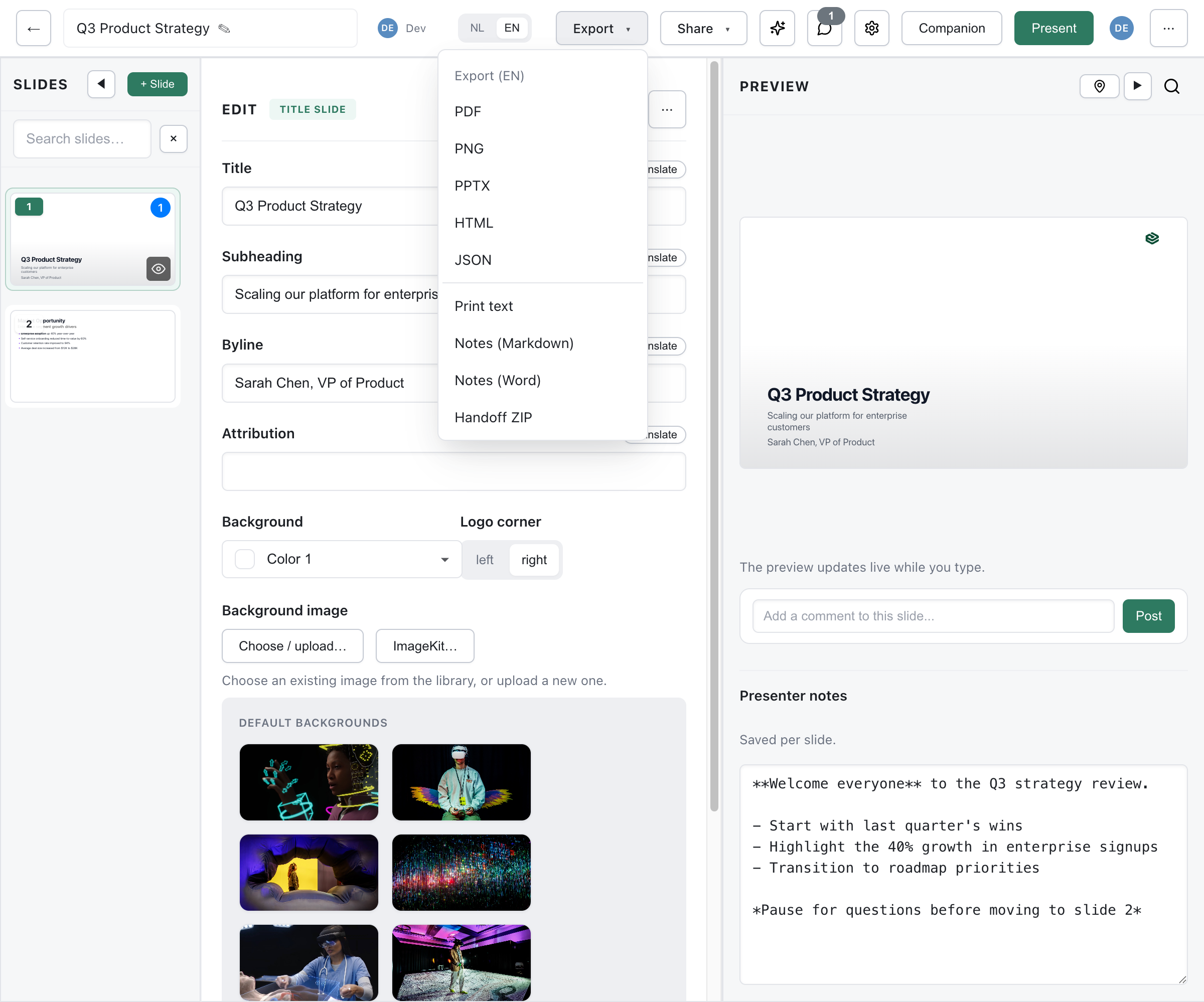
Creating a Handoff Bundle
Section titled “Creating a Handoff Bundle”- Open your presentation in the editor
- Click Export in the top bar. On a narrow window the button moves into the ⋯ menu; the Public tab of the Share dialog also links to it
- Choose the language version at the top of the dialog, if the deck has more than one
- Click Handoff ZIP under Data & bundle
Deckyard renders every format on the server, so a large deck can take a while; a progress window counts the slides and has a Cancel button. The ZIP always contains all of the files below; there are no options to leave formats out.
What’s Included
Section titled “What’s Included”handoff.pdfhandoff.pptxhandoff.htmlnotes.mdnotes.docxREADME.mdpng/├── slide-01.png├── slide-02.png└── ...| File | What it is |
|---|---|
handoff.pdf | One slide per page, 16:9 |
handoff.pptx | PowerPoint file in which each slide is an image; see PowerPoint Export |
handoff.html | The deck as one self-contained web page with its own slide navigation |
png/ | One image per slide |
notes.md, notes.docx | The speaker notes as Markdown and as a Word document |
README.md | Title, language, slide count and image scale, plus a short description of the files |
Follow-along invite slides are left out of every file, because they only mean something during a live session. If you only have view access to the deck, the bundle holds what a viewer sees: slides that viewers do not see are left out and the notes files have no notes in them.
Nothing in the Bundle Is Editable Slide Content
Section titled “Nothing in the Bundle Is Editable Slide Content”The PDF, the PNG images and the slides in the PowerPoint file are all pictures of the rendered slides. They look exactly like the deck, but the text cannot be edited in PowerPoint or another slide tool. The only exception is video slides in the PowerPoint file, which are handled as described in PowerPoint Export. In the PDF and PNG files a video slide is a static placeholder.
Someone who needs to change the content needs access to the deck in Deckyard, or a JSON or .deck export for a technical handover.
Offline Use and Network Requirements
Section titled “Offline Use and Network Requirements”The PDF, the PNG images and the PowerPoint file need no network: images, including ones linked from other websites, are captured when the bundle is made.
The HTML file carries most of what it needs inside itself. Opened straight from disk, without a server, it still shows:
- Uploaded images and images from your image library
- The theme’s fonts, if they are built into Deckyard or uploaded
- Icons, code highlighting and math formulas
- Slide navigation, fullscreen and auto-advance
Some things stay on the network, so check them before you rely on the HTML file without an internet connection:
- Images linked by URL from another website are not embedded in the HTML file and do not show offline.
- Fonts from Adobe Fonts, Monotype or Google Fonts, loaded through a link in the theme, need a connection; offline, the browser falls back to another font.
- Videos from YouTube, Vimeo or Bunny Stream are streamed and do not play offline.
- Polls, Q&A and follow-along need a live session on your Deckyard instance. A downloaded file cannot collect votes or questions.
For presenting without a connection, the PDF and the PowerPoint file are the safest choices.
Image Resolution
Section titled “Image Resolution”The slide images in png/ and in the PowerPoint file are rendered at twice the 1600 × 900 slide canvas. The export API accepts a scale parameter from 1 to 3; the export dialog always uses the default.
| Scale | Resolution |
|---|---|
| 1 | 1600 × 900 |
| 2 (default) | 3200 × 1800 |
| 3 | 4800 × 2700 |
A higher scale gives sharper images and a larger ZIP.
Use Cases
Section titled “Use Cases”- Client handoff: one download with a format for every purpose, for someone without a Deckyard account.
- Presenting elsewhere: the PDF or PowerPoint file on a venue’s computer, the PNG images for a screen that only shows pictures.
- Archive: a snapshot of a finished deck in widely readable formats.