

Converting Slides
Change a slide’s type without losing content.
How to Convert
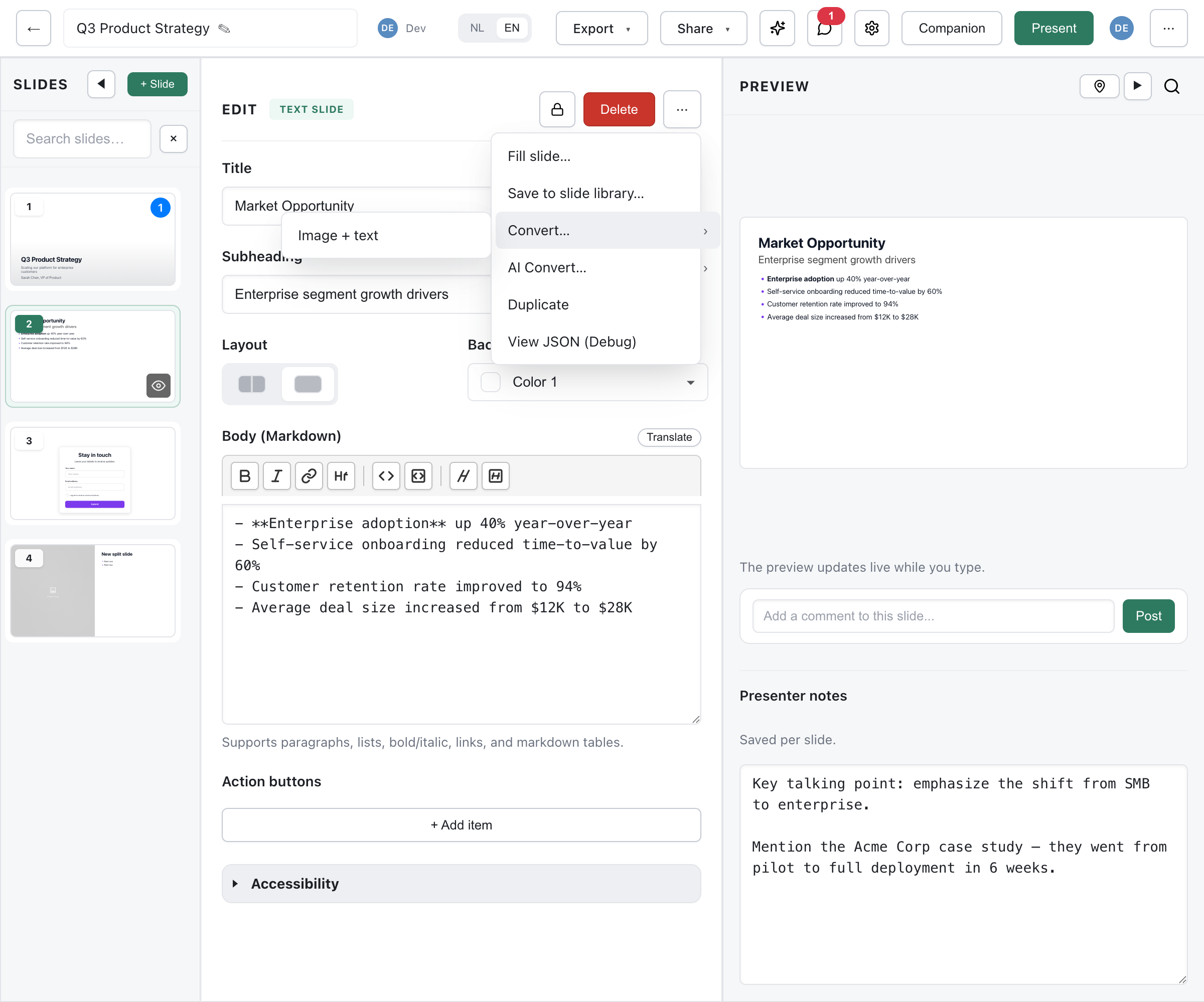
Section titled “How to Convert”- Select the slide you want to convert
- Click the ⋯ (More options) button in the edit panel header
- Hover over Convert… to see available target types
- Click the target slide type
- Content is mapped to the new type’s fields
Content Mapping
Section titled “Content Mapping”When converting, Deckyard tries to preserve your content:
- Titles carry over to the new slide’s title field
- Body text moves to the equivalent content field
- Images are kept if the new type supports them
When to Convert
Section titled “When to Convert”- You started with a list slide but realize a card layout works better
- A content slide would be more impactful as a quote slide
- You want to try different layouts without retyping
Limitations
Section titled “Limitations”Some conversions may lose data:
- Converting from a type with many fields to one with fewer
- Specialized fields (like chart data) don’t map to other types
- Images may be dropped if the new type doesn’t support them
Tip: If unsure, duplicate the slide first, then convert the copy.
Best Matches
Section titled “Best Matches”| From | Good Conversions |
|---|---|
| Content | List, Quote, Payoff |
| List | Content, Cards |
| Cards | List, Icon Cards |
| Quote | Content, Payoff |