

GDPR & Privacy
Deckyard includes features that help you meet GDPR and other privacy rules. As a self-hosted application, it keeps your data in your own database; compliance itself (a privacy policy, a legal basis, agreements with your users) stays with you as the operator.
Overview
Section titled “Overview”Deckyard provides:
- Data export for each user (right of access)
- Erasure of view analytics, for signed-in users and for anonymous viewers
- A personal opt-out from engagement tracking
- Retention and IP anonymization settings for analytics
Deckyard has no cookie consent banner, no cookie categories and no setting for a privacy policy link. See Cookies for what it does set.
Data Export
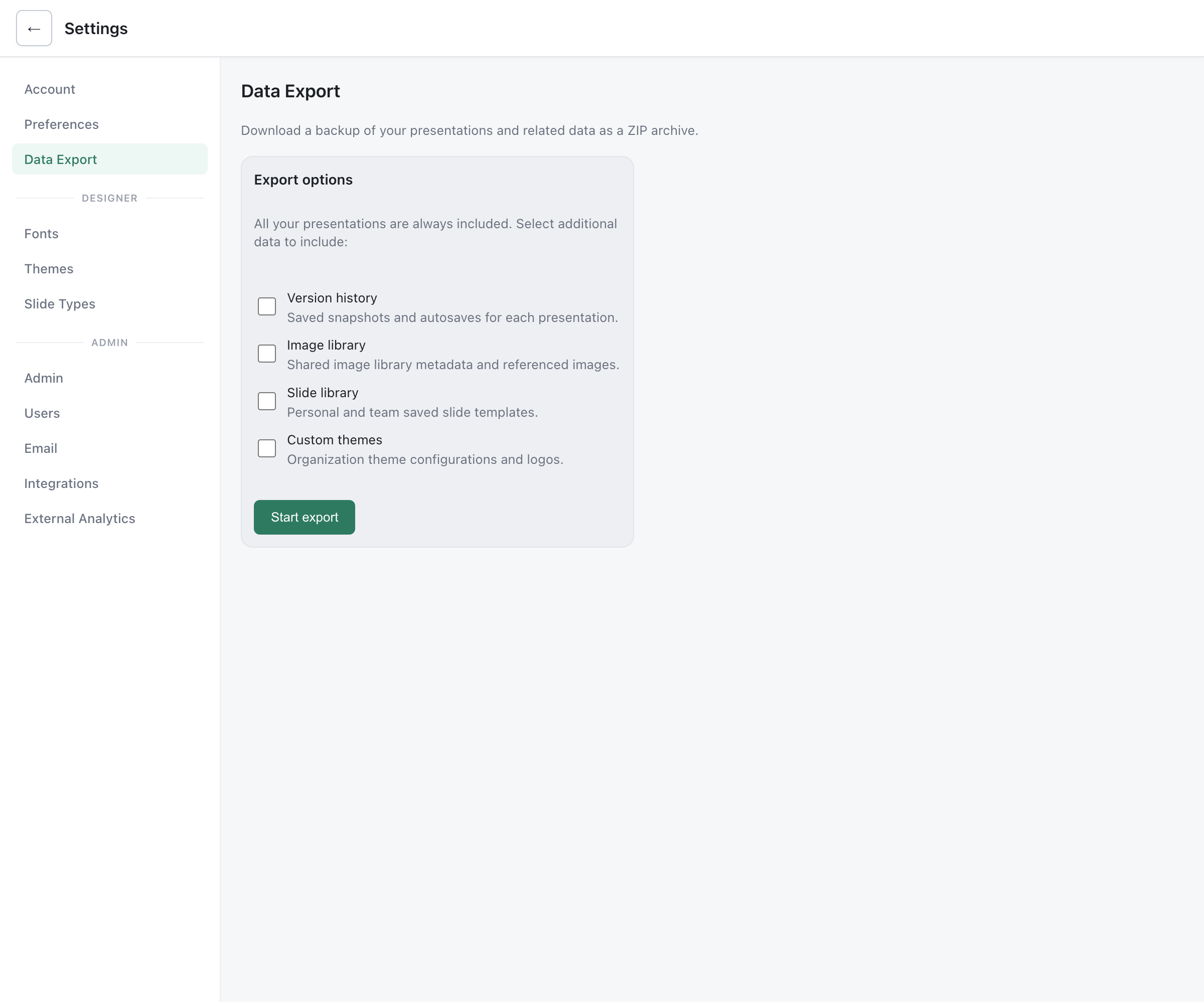
Section titled “Data Export”Users can export their own data using the Data Backup feature.
What’s Included
Section titled “What’s Included”A data export contains:
- Every presentation the user owns or created (as JSON)
- Referenced images (local uploads and remote URLs)
- Optionally: version history, image library, slide library, themes
Requesting an Export
Section titled “Requesting an Export”- Go to Settings > Data Export
- Select which additional data to include
- Click Start export
- When the export is ready, you get an in-app notification (and an email, if email sending is configured); click Download backup
The download is available for 2 hours. See Data Backup for full details.
Export Format
Section titled “Export Format”The export is a ZIP archive with:
- JSON files for presentations and structured data
- Images and media files in their original format
There is no admin export on behalf of another user; each user exports their own data.
Engagement Tracking
Section titled “Engagement Tracking”Deckyard records view analytics for the owner of a presentation: views, duration and slides seen. Most viewers are anonymous people on a share link or in a live follow session.
Personal Privacy Settings
Section titled “Personal Privacy Settings”Each signed-in user controls how their own views are tracked:
- Go to Settings > Preferences
- In the Privacy card:
- Opt out of all engagement tracking: your views are not recorded in any analytics
- Allow my views to be attributed to me: presenters can see your name when you view their presentations (off by default)
- Click Save
Signed-in people who follow a live session are not tracked at all.
Anonymous Viewers: Forget Me
Section titled “Anonymous Viewers: Forget Me”While tracking is active, viewers on a share link or in follow mode see a Forget me button. It erases the viewing history recorded for that device, across every presentation on the instance, after the viewer confirms.
Erasing Your Own Analytics
Section titled “Erasing Your Own Analytics”Signed-in users can export or erase the view analytics recorded under their email address through the API:
GET /api/analytics/my-data # exportDELETE /api/analytics/my-data # eraseBoth cover the whole instance. There is no button for this in the settings.
Retention
Section titled “Retention”Admins set how long analytics are kept:
- Go to Settings > Admin
- In the Engagement Insights card, under Data retention:
- Keep session data for: 30, 60, 90 (default), 180 or 365 days
- Anonymize IP addresses after: 1, 7 (default), 14 or 30 days
The environment variables ANALYTICS_RETENTION_DAYS and ANALYTICS_IP_ANONYMIZATION_DAYS set the starting values. Switching off Enable engagement insights in the same card stops tracking for the whole instance.
Deleting Users and Data
Section titled “Deleting Users and Data”Deleting a User
Section titled “Deleting a User”Admins delete a user under Settings > Users with Delete. This removes the account and any pending password reset tokens. It does not remove the user’s presentations, settings or analytics, and there is no self-service account deletion.
Before deleting a user, transfer their presentations to someone who stays.
Transferring Presentations
Section titled “Transferring Presentations”Only the owner of a presentation can transfer it:
- Open the presentation and click Share
- In the Team tab, click Transfer next to your name
- Enter the email address of the new owner, who must already be a collaborator with edit access
See Ownership Transfer for details.
Deleted Presentations
Section titled “Deleted Presentations”Presentations moved to the trash are permanently deleted after the trash retention period (30 days by default).
Cookies
Section titled “Cookies”Deckyard sets only first-party cookies, all needed for the app to work:
| Cookie | Purpose | Lifetime |
|---|---|---|
sb_session | Sign-in session | 14 days |
sb_oidc | SSO sign-in state | 10 minutes |
sb_qa | Recognizes a device for Q&A upvotes | 90 days |
sb_int | Recognizes a device for poll votes | 90 days |
sb_sandbox | Sandbox mode only | Configurable |
The analytics device ID is kept in the browser’s local storage, not in a cookie. Deckyard does not read the Do Not Track header.
Third Parties
Section titled “Third Parties”Nothing is sent to third parties unless you configure it:
- External analytics (Settings > External Analytics): Umami, Plausible and Matomo are marked privacy-friendly; Google Analytics sets cookies and shares data with Google. If you use it, you need to provide your own consent banner and privacy policy.
- Video embeds use
youtube-nocookie.comand the Vimeo player - Externally managed fonts load from Google Fonts, Typekit or Monotype
- Integrations such as Unsplash and AI providers, when enabled
Compliance Checklist
Section titled “Compliance Checklist”- Privacy policy published on your own site
- Consent banner in place if you use an external analytics provider that sets cookies
- Analytics retention and IP anonymization set to what your policy states
- Users know about Data Export and the privacy settings
- A process for deleting accounts, including transferring presentations first
- Data processing agreements in place for any configured integrations